Cross-device sync makes switching between your phone, tablet, and desktop while betting effortless. Start a bet on one device, update it on another, and finalise it elsewhere - all without losing progress or data. This tech keeps your account settings, balances, and bets consistent across devices in real time, ensuring a smooth and secure experience.
Key Benefits for Aussie Bettors:
- Consistent Account Management: Balances, bonuses, and bet history stay updated across devices.
- Enhanced Security: Features like Face ID and fingerprint login ensure safe access.
- Real-Time Updates: Odds, rewards, and transactions sync instantly.
- Device-Specific Features: Quick actions on mobile and detailed options on desktop.
Platforms like Aussie2Win are leading the way, offering real-time syncing for a hassle-free betting experience.
Benefits of Cross-Device Synchronisation for Australian Bettors
Betting Across Multiple Devices
Cross-device synchronisation makes betting across different devices effortless. Imagine starting a bet slip on your phone while enjoying the footy at the pub, checking updated odds on your desktop when you get home, and placing the final wager on your tablet just before kick-off - all without losing any selections or experiencing delays. This smooth experience is made possible by smart session management, which keeps your bets and chosen markets intact as you move between devices.
In addition to making betting seamless, synchronisation keeps your account details consistent and up-to-date.
Unified Account Management
With synchronisation, your account balances, betting history, and bonuses are always aligned, no matter which device you're using. Gone are the days of wondering if a deposit has been processed or if a bonus has been applied - updates happen instantly across all platforms. This technology also ensures that deposit limits, timeouts, and self-exclusion settings are consistently enforced across devices, reducing the risk of accidentally bypassing safety measures.
This streamlined approach also extends to security, ensuring peace of mind as you switch devices.
Improved Security and Access
Synchronisation doesn’t just make betting more convenient; it also enhances security. Platforms use consistent identity checks and authentication processes across all devices, whether you're logging in via a mobile app or a web browser. Features like Face ID, fingerprint sensors, and secure payment options (such as Apple Pay, Google Pay, and PayID) provide fast access while maintaining strong security. This means you’re protected whether you’re depositing funds on your phone or withdrawing winnings from your laptop.
These advantages highlight how platforms like Aussie2Win are using synchronisation to improve every aspect of the betting experience.
sbb-itb-b6f7e81
How Aussie2Win Uses Cross-Device Synchronisation

Consistent Experience on All Devices
Aussie2Win ensures your account stays updated across all devices with a centralised login system. This means your balance, transaction history, and settings remain synchronised, whether you're claiming a 100% welcome bonus and 200 free credits on your mobile or checking out an 8% daily rebate on your desktop. The platform's Live Transaction feed keeps you informed with real-time updates on deposits and withdrawals, so you can track your financial activity no matter which device you're using.
Real-Time Updates for Bonuses and Rewards
With real-time notifications, Aussie2Win makes sure your data syncs instantly. For instance, if you claim a bonus through the Promo section on one device, it becomes immediately available for gameplay on another. Features like daily check-in progress, lucky draw numbers (earned with every AUD 30 deposit), and rebate tracking are updated across all platforms automatically.
"The client always reads from and writes to a local store... That store is responsible for updating the state optimistically... and syncing it back and forth with the backend." – Isaac Hagoel, Principal Engineer
Withdrawals are processed quickly, often within minutes, regardless of whether you're cashing out via phone or desktop. To avoid delays, make sure your registered name matches the name on your bank account exactly.
Device-Specific Features
While Aussie2Win keeps your account data consistent, it also tailors features to suit different devices. On mobile, you'll find tap-friendly "Quick Steps" for fast wallet access and one-tap bonus claims, making deposits and withdrawals effortless on the go. The desktop version, on the other hand, provides a more detailed interface with a sidebar menu offering sections like Game RTP and Leaderboard, perfect for analysing bets and reviewing transaction history.
The Daily Check-in system also works seamlessly across devices, offering bonuses like 30% on Mondays and Wednesdays and 50% on Saturdays. However, keep in mind that your streak resets after 24 hours of inactivity. By combining consistent data sync with device-specific enhancements, Aussie2Win ensures a smooth and hassle-free experience, setting the stage for easy cross-device setup in the next section.
How to Set Up Cross-Device Synchronisation on Aussie2Win
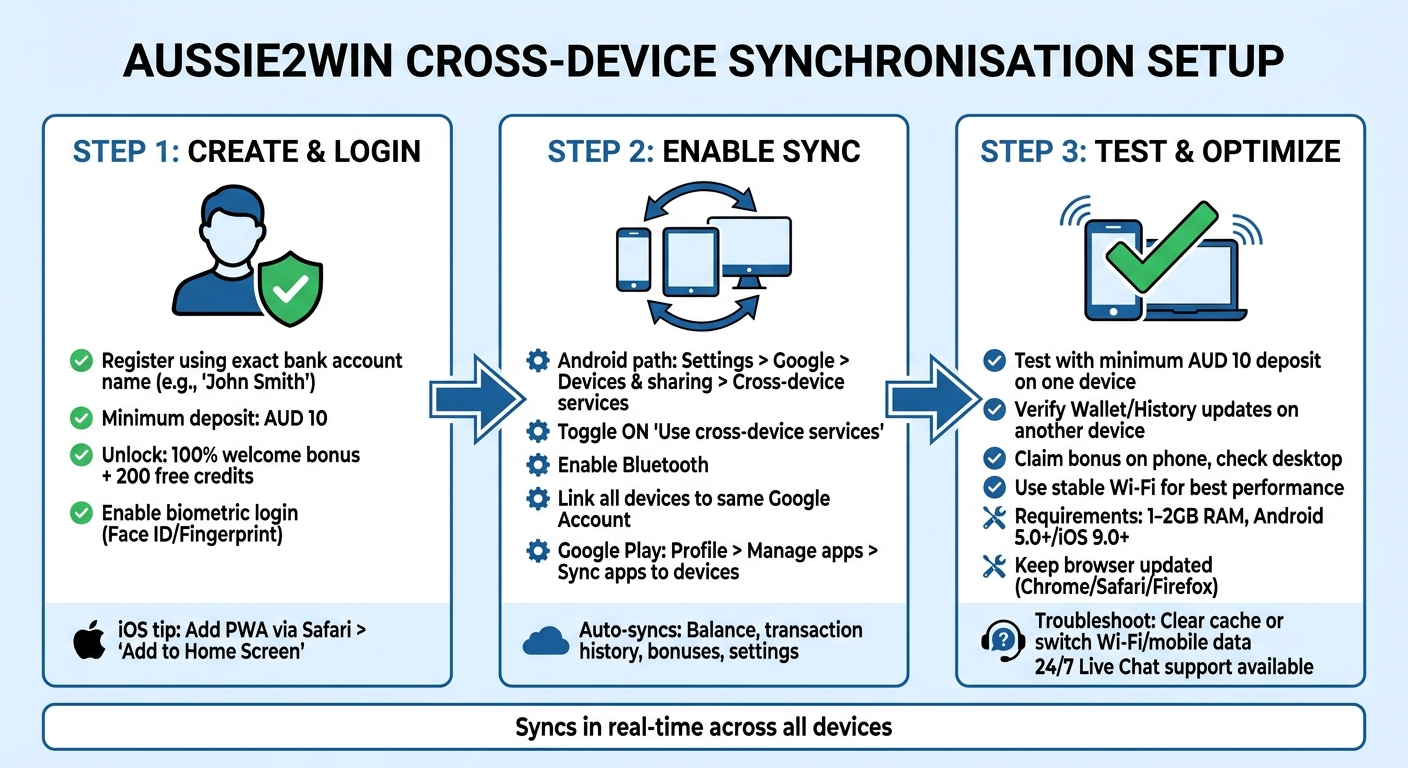
How to Set Up Cross-Device Sync on Aussie2Win in 3 Steps
Here’s a step-by-step guide to help you set up your account and enable cross-device synchronisation on Aussie2Win.
Creating and Logging Into Your Account
To get started, register on Aussie2Win using the exact name linked to your bank account (e.g., 'John Smith' must match precisely). This ensures smooth deposit and withdrawal transactions. Keep in mind that the minimum deposit is AUD 10. This amount also qualifies you for a 100% welcome bonus and 200 free credits.
Once your account is set up, consider enabling biometric login - such as Face ID or Fingerprint - for quicker and more secure access. If you’re using an iPhone, you can streamline access by opening Aussie2Win in Safari, selecting 'Add to Home Screen', and creating a Progressive Web App (PWA). This allows for one-tap access.
Enabling Cross-Device Synchronisation
After securing your account and activating biometric login, you’re ready to enable cross-device synchronisation. If you’re using an Android device, follow these steps:
- Go to Settings > Google > Devices & sharing > Cross-device services.
- Toggle on 'Use cross-device services'.
- Make sure Bluetooth is turned on and that all devices are linked to the same Google Account.
To ensure apps sync automatically across devices like tablets, phones, or smartwatches, open the Google Play Store, tap your Profile icon > Manage apps and device > Sync apps to devices, and select the devices you want to sync.
Aussie2Win’s centralised login system takes care of the rest. It automatically synchronises your balance, transaction history, bonuses, and settings across all connected devices. This means deposits, withdrawals, and bonus claims are updated seamlessly.
Testing and Optimising Sync Features
Once sync is enabled, it’s a good idea to test it. Start by placing a small bet or making a minimum AUD 10 deposit on one device. Then, check if your Wallet or History updates immediately on another device. Similarly, try claiming a bonus through the Promo section on your phone and confirm that it appears on your desktop.
For the best experience, use a stable Wi‑Fi connection, especially during longer sessions, to avoid lags or brief disconnections. Ensure your device meets these minimum requirements:
- 1–2 GB RAM
- Android 5.0+ or iOS 9.0+
Also, keep your mobile browser (Chrome, Safari, or Firefox) and operating system updated. This ensures compatibility with the latest security encryption and synchronisation protocols.
If you notice data not updating correctly across devices, try clearing your mobile browser cache or switching between Wi‑Fi and mobile data. This can help resolve cached redirect issues. For persistent problems, Aussie2Win provides 24/7 Live Chat support, which you can access directly from the home interface.
Fixing Common Cross-Device Synchronisation Problems
Even with a well-configured setup, sync issues can pop up now and then. Here's how to handle them efficiently so you can get back to betting without any hiccups.
Fixing Login Problems
If you're having trouble logging in on another device, start by double-checking your registered email and password. After 3–5 wrong attempts, Aussie2Win will place a temporary security hold on your account for 30–60 minutes. Forgot your password? Use the "Forgot Password" link and keep an eye on your email - reset links expire within 60 minutes, so act quickly.
Using a VPN can also cause login issues due to geo-location mismatches. To avoid this, turn off your VPN and connect using an Australian IP address. If you're relying on Face ID or Touch ID, remember that these features are controlled by your device's OS, not Aussie2Win. Still stuck? Persistent lockouts or KYC-related restrictions can be resolved by reaching out to their 24/7 Live Chat support.
Resolving Data Sync Delays
If your account balance or bet history isn't syncing across devices, hit "REFRESH" in your wallet to manually update the data. If that doesn't do the trick, try clearing your browser's cache and cookies, switching between Wi-Fi and mobile data, or logging out and back in to reload the latest server data.
Keep in mind that most platforms log users out after 30–60 minutes of inactivity. If you've been idle, you'll need to log back in to reconnect. For stubborn sync problems, open Aussie2Win in an incognito or private tab to bypass any corrupted local storage. If you're using a Progressive Web App (PWA) shortcut, consider deleting and reinstalling it now and then to ensure you're running the latest version. Remember, synchronisation delays aren't the same as withdrawal delays - make sure your KYC documents (like an Australian driver's licence or passport) are verified to keep cashouts running smoothly. For ongoing issues, you can always contact 24/7 Live Chat.
Updating Bonuses and Rewards
If your bonuses or daily check-in rewards aren’t showing up across devices, tap "REFRESH" on your dashboard to sync the latest data. Check the "Check-in" tab to confirm you've completed the daily task - missing even a single day will reset your progress to Day 1. Also, claim your bonuses before playing, as they can't be applied retroactively after a deposit.
If rewards still seem stuck, try logging in via an incognito tab or re-logging into your account. Make sure you're only using your single, verified account across all devices - duplicate or fake accounts will result in forfeited benefits. For any recurring problems, reach out to their 24/7 Live Chat for quick support.
Conclusion
Main Points
Cross-device synchronisation takes your betting experience to the next level, allowing seamless transitions between devices. Whether you're placing a bet on your desktop during lunch or checking your balance on your phone while commuting, Aussie2Win ensures that your wallet, transaction history, and active bonuses are instantly updated across all devices and betting options.
The platform's real-time sync engine prioritises updates on your local device before syncing with the backend. This means you'll get immediate feedback on bets and bonus claims, even if your network connection isn't stable. Plus, your single login, verified details, and customer support remain consistent across devices, making the experience hassle-free.
Next Steps
Log in on both your mobile and desktop to see the seamless synchronisation for yourself. Test out features like daily check-in rewards, rebate updates, and the 100% Welcome Bonus - all accessible from any device. Make sure to claim your bonuses before you start playing and ensure your registered name matches your bank account for smooth and quick withdrawals.
With everything from your AUD balance to referral rewards at your fingertips, cross-device sync offers a more flexible and convenient way to enjoy betting.
FAQs
Will my bet slip carry over if I change devices mid-bet?
Your bet slip will transfer seamlessly when using cross-device synchronisation. Thanks to features like BetSync, your bets are tracked and updated in real-time across all your devices. This means you can switch between devices without any interruption or losing your progress.
Is cross-device sync safe to use on Aussie2Win?
Aussie2Win focuses on providing secure features, including fast payouts and reliable services, ensuring its cross-device sync prioritises user safety. To enhance your security, stick to trusted networks and enable account protection options. These simple steps help create a safer experience when managing your account across multiple devices.
What should I do if my balance or bonuses don’t update on another device?
If your balance or bonuses aren’t updating on another device, start by making sure cross-device sync is turned on. Double-check that you’re logged into the same account across all devices and that the sync features are enabled in the app settings. It’s also worth verifying your internet or Bluetooth connection is stable.
Still having trouble? Try logging out and back in, or, as a last resort, reinstall the app to reset the sync process.